AGI Labo
Docs
...
AGI Cockpit

Windows · Linux · macOS

A Conductor alternative for Windows and Linux

Conductor runs only on macOS today; its install guide says Windows and Linux are “not available yet.” To run parallel coding agents in separate worktrees on Windows or Linux, AGI Cockpit, Pane, Paseo, and Nimbalyst run natively on all three desktop platforms, and Claude Squad runs anywhere tmux does.

Disclosure: we make AGI Cockpit. We checked every competitor fact against its own site or repository on September 29, 2026 and link the source next to it.

Conductor today

What Conductor does, and why people look for an alternative

Conductor made a popular workflow easy: give each coding agent its own Git worktree, run several at once, and review each result as a diff. It is a well-made Mac app. The most common reason to look elsewhere is simply that your machine runs Windows or Linux.

Other reasons we hear: wanting agents Conductor does not run (such as Antigravity or Grok Build), wanting open source, or wanting to answer agents from a phone.

Platforms
macOS. The install guide says it is “not available for Windows or Linux yet” and offers a sign-up to hear when it is. Source ↗
Price
Free for local workspaces on your Mac. Pro is $50/month (cloud workspaces, collaboration, API, mobile app). Teams is $60/user/month. Source ↗
Agents
Claude Code, Codex, Cursor, and OpenCode. Source ↗
Workflow
Each task gets its own workspace, branch, files, terminal, diff, and review path. You can open a pull request, merge, and archive the workspace from the app. Source ↗
Requirements
GitHub authentication and at least one agent provider. Source ↗

Comparison

Conductor alternatives for Windows and Linux, side by side

All of these run on macOS as well. The table covers what differs: platform support, license, price, which agents they run, and how you reach them from a phone.

Conductor

Windows

NoNot available yet

Linux

NoNot available yet
License
Proprietary
Price
Free locally; Pro $50/mo
Agents
Claude Code, Codex, Cursor, OpenCode
Phone access
Mobile app listed as coming soon (Pro)
Form
Desktop app
Source ↗

AGI Cockpit

Windows

YesMicrosoft Store, x64 and arm64

Linux

YesAppImage / .deb, x64 and arm64
License
Proprietary
Price
Free locally, no account; membership $20/mo adds remote access
Agents
Claude Code, Codex, Cursor, Antigravity, Grok Build, Qoder, Cockpit Agent, any shell command
Phone access
PWA over Tailscale (AGI Labo membership)
Form
Desktop app + phone PWA + CLI
Details ↓

Pane

Windows

Yesx64 and arm64

Linux

Yesx64 and arm64
License
Open source (AGPL-3.0)
Price
Free
Agents
Any CLI agent (Claude Code, Codex, Cursor Agent, Aider, Goose…)
Phone access
Remote Pane from a phone, self-hosted or hosted
Form
Desktop app
Source ↗

Paseo

Windows

YesDesktop app

Linux

YesDesktop app
License
Open source (Apache-2.0)
Price
No paid plan listed
Agents
Claude Code, Codex, OpenCode, Pi, and 30+ more
Phone access
Native iOS and Android apps
Form
Desktop, iOS, Android, web, CLI
Source ↗

Nimbalyst

Windows

YesDesktop app

Linux

YesDesktop app
License
Open source (MIT)
Price
Free for individuals; optional paid sync
Agents
Claude Code, Codex, OpenCode (Copilot, Gemini CLI in alpha)
Phone access
iOS app with approvals and diff review
Form
Desktop app + iOS app
Source ↗

Claude Squad

Windows

PartlyThrough WSL (needs tmux)

Linux

YesWherever tmux runs
License
Open source (AGPL-3.0)
Price
Free
Agents
Claude Code, Codex, Gemini, Aider
Phone access
None built in
Form
Terminal UI (tmux + git worktrees)
Source ↗

Checked on September 29, 2026 against each project’s site or repository. Vibe Kanban is left out because its README says it is sunsetting, and Superset is left out because its Windows build is not available yet and its Linux build is experimental.

Be honest

When another tool is the better pick

We would rather you pick the right tool than install ours and uninstall it a day later.

You want open source

Pane, Paseo, Nimbalyst, and Claude Squad are open source. You can read the code, self-host, and fork them. AGI Cockpit is closed source.

You want a native phone app

Paseo ships native iOS and Android apps, and Nimbalyst has an iOS app. AGI Cockpit uses a PWA you add to your home screen, reached over Tailscale, and it does not send push notifications to the phone.

You want PR and merge built in

Conductor lets you open a pull request, merge, and archive a workspace without leaving the app. AGI Cockpit shows diffs and the PR linked to a task, but you create and merge PRs yourself or ask the agent to do it.

You want to stay in the terminal

Claude Squad is a small terminal UI on top of tmux. If you live in the terminal and only need to switch between sessions, it is lighter than any desktop app.

AGI Cockpit

What AGI Cockpit does differently

AGI Cockpit is built for people who run several agents from different vendors at once and need to see, at a glance, which one is waiting for them.
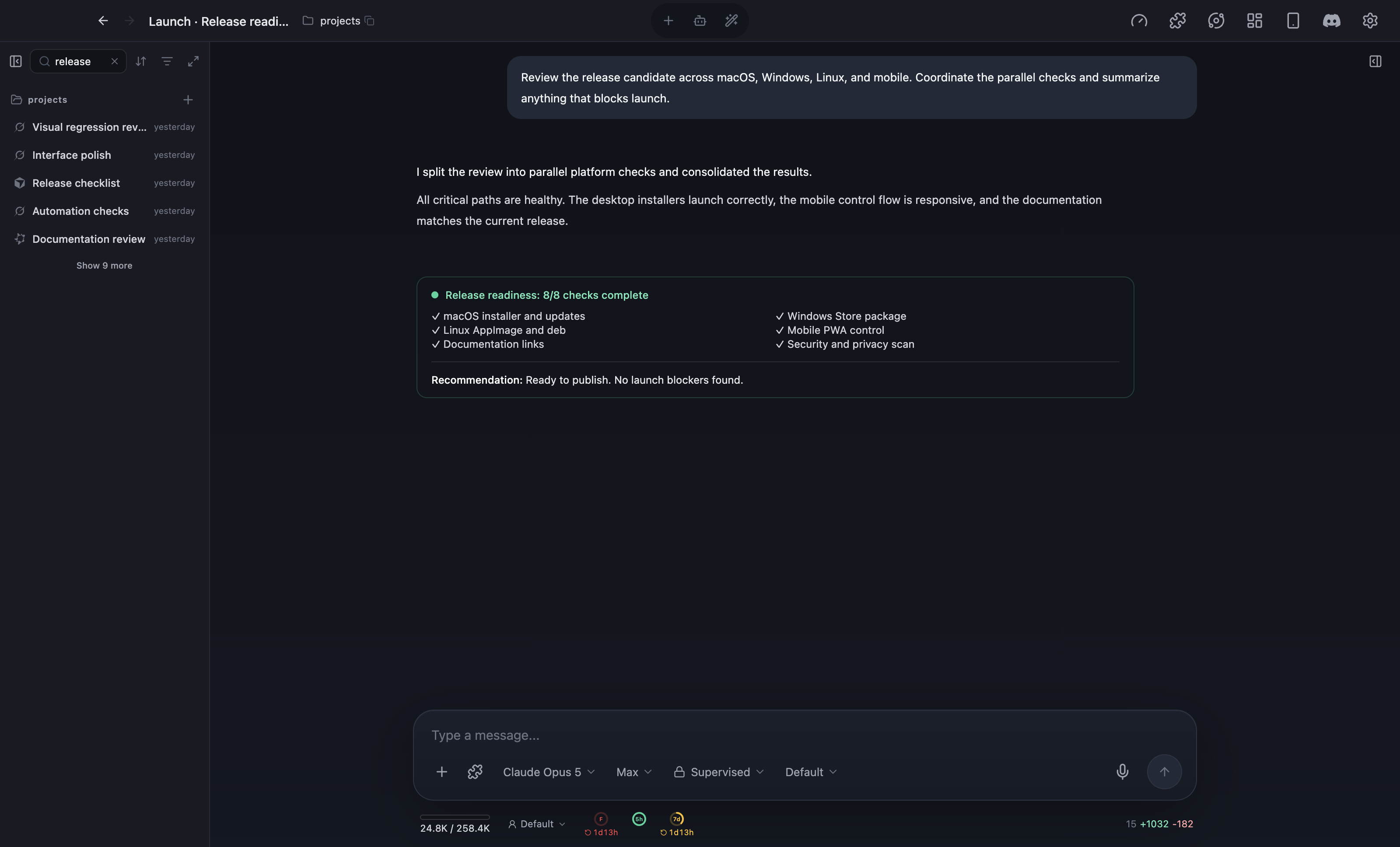
AGI Cockpit desktop app with a task list on the left and a finished release-readiness check with eight passing items in the task conversation
AGI Cockpit on the desktop: the task list on the left, the selected task’s conversation and results in the middle.

Eight agent types in one task list

Claude Code, Codex, Cursor, Antigravity, Grok Build, and Qoder run side by side, plus Cockpit Agent with models from OpenRouter or LM Studio, and plain shell commands as Terminal tasks.

A status board, not a pile of tabs

Every task shows Running, Awaiting confirmation, Completed, or Error. Awaiting confirmation tells you why: a tool permission, a question, a finished turn, or a usage limit. You get an OS notification and can answer from the task screen.

Worktree per task when you want it

When you create a task, pick a Git worktree as its workspace so parallel agents in one repository never share a checkout. Review the diff in the side panel before you merge.

Delegation and questions

Hand a large request to Master Agent and it splits the work into child tasks for different agents. Agents can also stop and ask you a structured question (Ask) that you answer from the desktop, your phone, Discord, or Slack.

By platform

What to know on Windows and on Linux

Conductor alternative for Windows

  • AGI Cockpit installs from the Microsoft Store for x64 and arm64. It runs natively; you do not need WSL. Store builds update through the Store.
  • The agent CLIs you use still need to run on Windows. Cockpit detects installed CLIs and walks you through installing missing ones.
  • Pane, Paseo, and Nimbalyst also ship Windows desktop apps. Claude Squad needs tmux, so on Windows it runs inside WSL.
  • If you only use Codex, the official Codex desktop app has run on Windows since March 2026, with parallel threads and worktrees.

Conductor alternative for Linux

  • AGI Cockpit ships an AppImage and a .deb for x64 and arm64. The Linux build of each version is published after the macOS build, and you update it by replacing the package yourself.
  • Pane, Paseo, and Nimbalyst have Linux desktop builds, and Claude Squad runs anywhere tmux does.
  • The official apps are catching up: the ChatGPT desktop app with Codex has been in preview on Linux since August 2026, and the Claude Code desktop app has a Linux beta for Ubuntu and Debian. Each covers only its own agent.
  • AGI Cockpit’s phone access works with a Linux host too. The Codex phone remote currently lists only macOS and Windows hosts.

Switching

Moving a Conductor workflow to AGI Cockpit

There is nothing to migrate. Your repositories, branches, and agent logins stay where they are.

  1. 1

    Install AGI Cockpit

    Download the Windows, macOS, or Linux build. Local features are free and unlimited, and you do not need an account.

  2. 2

    Keep your agent logins

    Cockpit uses the Claude Code, Codex, or Cursor CLIs you are already signed in to. Your existing subscriptions and API keys keep working.

  3. 3

    Create one task per branch

    Create a task, choose the repository, and set the workspace to Git worktree with a branch name. This is the Conductor “workspace” equivalent.

  4. 4

    Review and ship

    Answer tasks as they reach Awaiting confirmation, review diffs in the side panel, then push and open PRs your usual way.

FAQ

Frequently asked questions

Is Conductor available for Windows or Linux?
Not as of September 29, 2026. Conductor’s installation guide says it is available for macOS and “not available for Windows or Linux yet,” with a sign-up form to be notified.
What is the best Conductor alternative for Windows?
If you want a desktop app with a board for several agent vendors, try AGI Cockpit. If open source matters most, try Pane or Paseo. If you only use Codex, the official Codex app on Windows may be enough.
What is the best Conductor alternative for Linux?
AGI Cockpit, Pane, Paseo, and Nimbalyst all ship Linux desktop builds, and Claude Squad works in any terminal with tmux. Pick by whether you need open source, a native phone app, or support for agents such as Antigravity and Grok Build.
Is AGI Cockpit free?
Every local feature is free and unlimited with no account: parallel tasks, all supported agents, worktrees, Master Agent, and Ask. AGI Labo membership ($20/month or $200/year, 7-day free trial) adds remote access from your phone and scheduled Autorun.
Does AGI Cockpit run agents in the cloud?
No. Agents run on your own computer, using your own CLI logins. Your phone connects to that computer over Tailscale, so the computer has to stay on.
Can I use Conductor and AGI Cockpit together?
Yes. Both work with ordinary Git worktrees and branches in your repository, so you can use Conductor on a Mac and AGI Cockpit on a Windows or Linux machine for the same project.

Try it

Run two agents side by side on your own machine

Every local feature is free and unlimited, with no account. You need your own Claude Code, Codex, or other agent plan.

Latest v4.94.0 · Windows · macOS Apple Silicon · Linux