Autorun
AGI Labo membershipTasks that wake up
in the morning.
"Summarize today's news at 6 AM." Schedule by time or interval. Results appear in the same task list.
 AGI Cockpit
Claude Code, Codex, Cursor, Grok Build — plus OpenRouter and LM Studio.
Hand over a rough request, and your AI team splits it up and gets moving.
From asking to approving, work starts and finishes here — in one screen.
Windows · macOS Apple Silicon · Linux · Local features free & unlimitedClaude Code, Codex, and other agents require their own plans
Master Agent
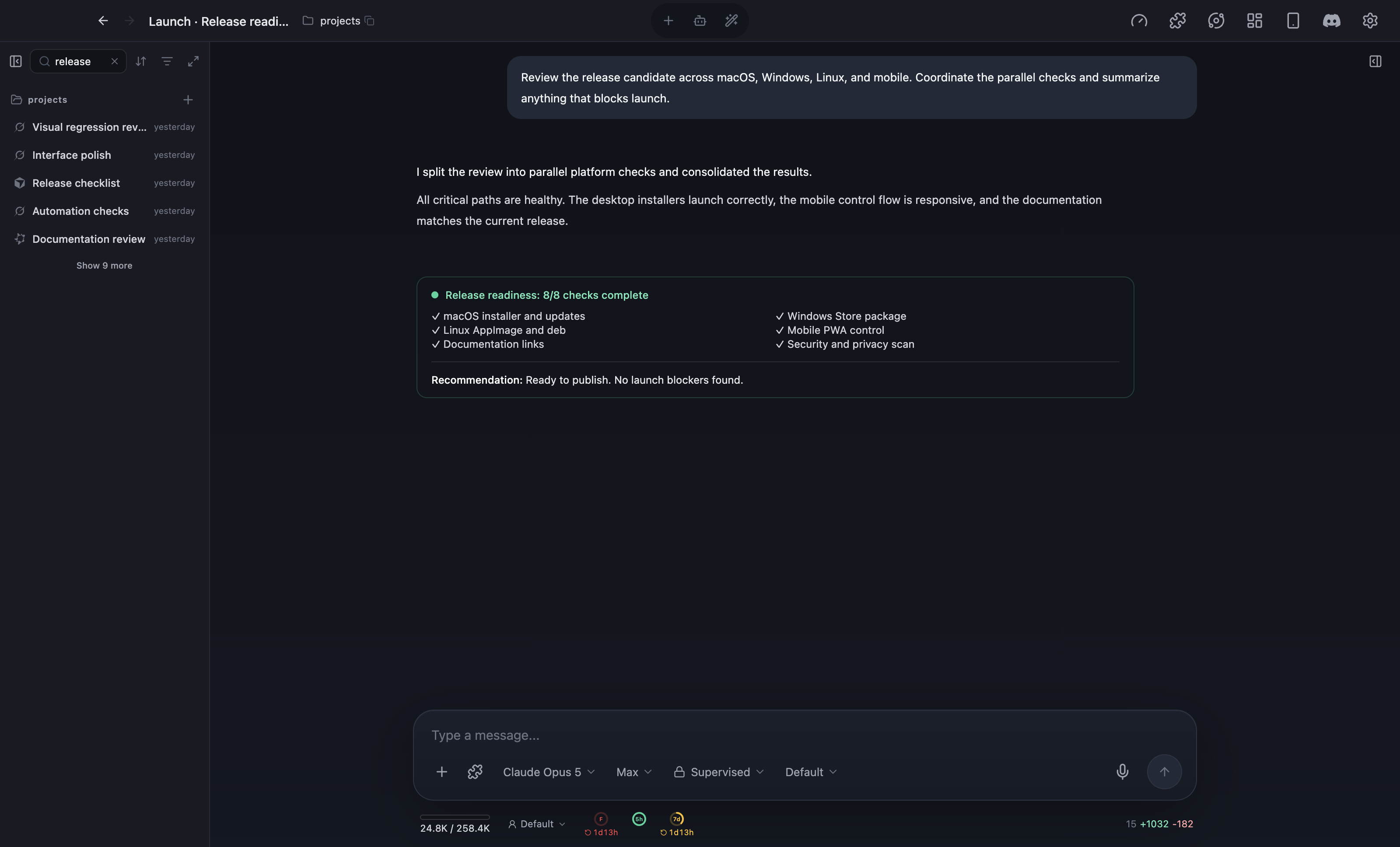
"Prep next week's launch." "Write the monthly report." Ask casually, and Master Agent decides which AI to hand it to, runs them in parallel when needed, and brings the results back together.
One screen
What's running, what's waiting, what's done. Cockpit ranks them by what needs your eyes — so handing more work to AI doesn't mean losing track of it.
Statuses update on their own. The time you spend checking “is it still running?” goes away.
cockpit ask
"Which one?" "Should I go ahead?" A floating window stays on top, and you reply with a tap or free text. You can answer from your phone, too. All you do is decide.
Native chat
Chat-style responses. File changes. Inline previews. You can tell at a glance what happened. And while it's running, your next instructions just go on the queue.
Diffs
Changed files side by side
Preview
Articles, Markdown right there
Queue
Stack next instructions
Images
Generated images in-thread
HTML Mode
Dashboards, choice buttons, forms. Instead of reading a paragraph and typing a reply, you look, click, and move on. Whatever you input flows back to the AI to continue.
Cockpit Agent
The first-party Cockpit Agent runs on cloud models via OpenRouter or local models via LM Studio — so you can balance cost, privacy, and quality per task.
OpenRouter
Pick from Grok, Qwen, DeepSeek and more, with price and context length right in the picker.
LM Studio
Use a locally-loaded model on your own machine, ideal for sensitive data.
Autonomy
Plan only, approve risky actions, or fully auto — dial in how much you hand over, anytime.
Built for daily use
Schedule. Reply from your phone. Call up Cockpit from your usual Claude Code or Codex. Built for fitting AI into actual daily routines.
Autorun
AGI Labo membership"Summarize today's news at 6 AM." Schedule by time or interval. Results appear in the same task list.
PWA Mobile
AGI Labo membershipCreate tasks, send follow-ups, attach images, and reply to cockpit ask — all from a PWA on the go.
cockpit skill
Install the cockpit skill into Claude Code, Codex, Antigravity, Cursor, or Grok Build. They can create Cockpit tasks right from a normal conversation.
Real tasks
At AGI Labo, the whole company runs through Cockpit — development, marketing, even event ops. A few real tasks from a recent day.
“Create the Luma event for the next lecture, from thumbnail to publish”
“Transcribe yesterday’s lecture recording and shape it into an archive article”
“Draft three X posts from the v4.17 release notes”
“Triage open GitHub issues and propose today’s top three”
“Pull this week’s membership numbers from Stripe into a report”
“Reorganize this page’s benefits and propose new hero copy”
Writing code, drafting articles, crunching numbers, setting up events — if it happens on a computer, you can hand it over.
Voices
From developers to founders — real posts from X.
AGI Cockpit is incredible. I can develop an iPhone app using only my iPhone: work on it from bed, spot a bug, request a fix on the spot, and have the corrected build launch on my phone three minutes later. I can even push the latest build to App Store Connect from my phone through Claude Code skills. The future is here.
No exaggeration: AGI Cockpit is genuinely excellent for moving development forward in parallel. It fits this new era of running multiple agents at once. When I’m building, I keep wanting to queue the next task, and Cockpit is much better suited to that than splitting a terminal into panes just to assign work.
Specs
| Supported agents | Claude Code / Codex / Antigravity / Cursor / Grok Build / Cockpit Agent (first-party) |
|---|---|
| Model providers | OpenRouter and LM Studio (local models) |
| Platforms | Windows / macOS (Apple Silicon) / Linux (AppImage and .deb, x64 and arm64) |
| Pricing | Local features are free and unlimited, with no account required. AGI Labo membership is $20/month or $200/year, with a 7-day free trial |
| Free features | Every local feature, including parallel task management, Master Agent task splitting, HTML Mode, cockpit ask, the side panel, in-app browser, and session history dashboard |
| AGI Labo membership adds | Autorun scheduling, remote access from your phone or another device, and smart routing that picks the agent and model for each task |
| Distribution | Microsoft Store / .dmg / AppImage and .deb |
FAQ
To use Claude Code, Codex, and the like, you need each agent’s CLI and plan; the app guides you through installing any missing CLIs. The first-party Cockpit Agent runs with an OpenRouter API key or a local LM Studio.
Every local feature is free and unlimited. Parallel task management, every supported agent, Master Agent, HTML Mode, and the session history dashboard all work without an account, with no task caps or trial timer.
Three Cockpit features: Autorun scheduling, remote access from your phone or another device, and smart routing, which picks the agent and model for each task. Membership is $20/month or $200/year with a 7-day free trial, and also includes AGI Labo articles, courses, and community benefits.
View AGI Labo membership plansWindows, macOS (Apple Silicon), and Linux (AppImage / .deb, x64 and arm64).
AGI Cockpit is a work OS, not just a coding-agent runner. It unifies Claude Code, Codex, Antigravity, Cursor, and Grok Build — plus OpenRouter and LM Studio models — on one screen, runs on Windows, macOS, and Linux, and adds Master Agent task splitting, Autorun scheduling, remote control from your phone, and HTML Mode for rich outputs. That makes it suited for any work on your computer, not only coding.
Compare Conductor alternatives for Windows and LinuxThe official app is dedicated to Claude Code. AGI Cockpit runs multiple agents side by side in one task list — including Claude Code — with task splitting, scheduled runs, and mobile access in a single screen. They also work together: install the cockpit skill in Claude Code and it can create Cockpit subtasks from your usual sessions.
No. Writing articles, crunching numbers, preparing events, research — anything you do on a computer can be delegated. At AGI Labo we run development, marketing, and event operations entirely on Cockpit.
This is a false positive by Norton’s heuristic detection (we have filed a false-positive report with Norton). Open Norton’s Security → History, switch the view to Quarantine, select the AGI Cockpit item, and choose “Restore & exclude this file”. Then launch the app again; if it does not start, reinstall it from the Microsoft Store.
Release history
Since v2.0
Download
Morning news digest. A draft article. Cleaning up notes. Put one thing you already do every day into Cockpit, and the rest falls into place.
Windows · macOS Apple Silicon · Linux · Local features free & unlimitedClaude Code, Codex, and other agents require their own plans


