Google Places APIは、ローカルビジネスや地点の情報を提供する強力なツールです。
今回使用するのは、特に、textSearch と呼ばれる API です。
タイトルはレストラン検索と書きましたが、実際には、どんな場所でも検索できます。
GPTとこのAPIを組み合わせることで、ユーザーが自然言語で質問したときに、即座に関連するレストラン情報を提供することが可能になります。
本記事では、GPTのActions機能を利用して、どのようにGoogle Places APIを統合し、レストラン検索機能をGPTに付与するかを、ステップバイステップで説明します。
このプロセスを通じて、GPTの拡張性を最大限に活用し、ユーザーに新たな価値を提供する方法を探ります。
Google Places API とは?
Google Places APIは、Googleの提供する強力なツールの一つで、地域のビジネスや地点に関する豊富な情報をアクセス可能にします。
このAPIを利用することで、特定の場所やビジネスに関連するデータ、例えばレストランの場所、営業時間、評価、さらにはユーザーのレビューや写真まで、簡単に取得できます。
Google Places APIは、特にローカル検索や地理的な情報が必要なアプリケーションにとって、非常に価値の高いリソースとなります。
このAPIの大きな特徴は、その正確性と包括性です。Googleの広範囲にわたるデータベースを背景に、世界中のほとんどの場所やビジネスについての情報を提供しています。
また、リアルタイムの情報が含まれるため、例えばレストランの最新の営業状況や顧客の最新のフィードバックを反映したデータを取得することができます。
Google Places APIの機能は多岐にわたりますが、主に以下のような機能があります:
場所検索:キーワードや種類に基づいて特定の場所やビジネスを検索。
詳細情報の取得:特定の場所の詳細情報、例えば住所、電話番号、ウェブサイトURLなどの取得。
ユーザーレビューと評価:実際の訪問者による評価やレビューの取得。
写真:ビジネスや場所の写真へのアクセス。
これらの機能を活用することで、ユーザーが求める具体的な情報を効率的かつ迅速に提供することが可能となります。
特に、GPTとの組み合わせにより、自然言語での問い合わせに対してこれらの情報を瞬時に返答することができるようになります。
この記事では、Google Places APIの基本的な概要とその強力な機能について紹介します。
Actions に Google Places API を設定する
いきなりですが、Google Places API を GPT に設定する方法を見ていきます。
GPTs に Actions を追加する方法の基礎、
そもそも GPTs の Actions とは何かについては、
以下の記事をご覧ください:
https://agi-labo.com/articles/n7f4e62f21867
Step 1. YAML の設定
まずは、YAML を設定します。以下をコピペします。
openapi: "3.1.0"
info:
  title: "Google Places Text Search API"
  description: "API for performing text searches for places in Google Places."
  version: "1.0.0"
servers:
  - url: "https://maps.googleapis.com/maps/api/place/textsearch"
paths:
  /json:
    get:
      summary: "Perform a text search for places."
      description: "Returns information about a set of places based on a string query like 'pizza in New York' or a location 'near Ottawa'."
      operationId: "textSearch"
      parameters:
        - name: key
          in: query
          required: true
          description: "ここにAPIキーを設定します"
          schema:
            type: string
        - in: query
          name: query
          required: true
          schema:
            type: string
          description: "The text string on which to search, such as 'restaurant' or '123 Main Street'."
        - in: query
          name: location
          schema:
            type: string
          description: "The latitude and longitude around which to retrieve place information (format: latitude,longitude)."
        - in: query
          name: radius
          schema:
            type: integer
          description: "Defines the distance (in meters) within which to return place results."
        - in: query
          name: language
          schema:
            type: string
          description: "The language in which to return results."
        - in: query
          name: maxprice
          schema:
            type: integer
            enum: [0, 1, 2, 3, 4]
          description: "Restricts results to only those places within the specified price range."
        - in: query
          name: minprice
          schema:
            type: integer
            enum: [0, 1, 2, 3, 4]
          description: "Restricts results to only those places above the specified price range."
        - in: query
          name: opennow
          schema:
            type: boolean
          description: "Returns only those places that are open for business at the time the query is sent."
        - in: query
          name: pagetoken
          schema:
            type: string
          description: "Returns the next 20 results from a previously run search."
        - in: query
          name: region
          schema:
            type: string
          description: "The region code, specified as a ccTLD ('top-level domain') two-character value."
        - in: query
          name: type
          schema:
            type: string
          description: "Restricts the results to places matching the specified type."
      responses:
        '200':
          description: "Successful response with place search results."
          content:
            application/json:
              schema:
                $ref: '#/components/schemas/TextSearchResponse'
components:
  schemas:
    TextSearchResponse:
      type: object
      properties:
        html_attributions:
          type: array
          items:
            type: string
        results:
          type: array
          items:
            $ref: '#/components/schemas/Place'
        status:
          type: string
        error_message:
          type: string
        next_page_token:
          type: string
    Place:
      type: object
      properties:
        business_status:
          type: string
        geometry:
          type: object
          properties:
            location:
              type: object
              properties:
                lat:
                  type: number
                lng:
                  type: number
            viewport:
              type: object
              properties:
                northeast:
                  type: object
                  properties:
                    lat:
                      type: number
                    lng:
                      type: number
                southwest:
                  type: object
                  properties:
                    lat:
                      type: number
                    lng:
                      type: number
        icon:
          type: string
        name:
          type: string
        opening_hours:
          type: object
          properties:
            open_now:
              type: boolean
        photos:
          type: array
          items:
            $ref: '#/components/schemas/Photo'
        place_id:
          type: string
        plus_code:
          type: object
          properties:
            compound_code:
              type: string
            global_code:
              type: string
        price_level:
          type: integer
        rating:
          type: number
        types:
          type: array
          items:
            type: string
        user_ratings_total:
          type: integer
        vicinity:
          type: string
    Photo:
      type: object
      properties:
        height:
          type: integer
        html_attributions:
          type: array
          items:
            type: string
        photo_reference:
          type: string
        width:
          type: integer
ステップ2:Google Places API の API キーを取得
Google Places API 使用するには、APIキーが必要です。
以下のURLから取得します。
https://developers.google.com/maps/documentation/places/web-service/get-api-key?hl=ja
Step 3: API キーを設定する
続いて、取得したAPI キーを、GPT に設定していきます。
「ここにAPIキーを設定します」と書いてあるYAMLの部分にAPIキーを入力します。これで実装は完了です。
Step 3:テストとデバッグ
実際に動作するかみてみましょう。
実際にテストしてみた様子がこちらです:
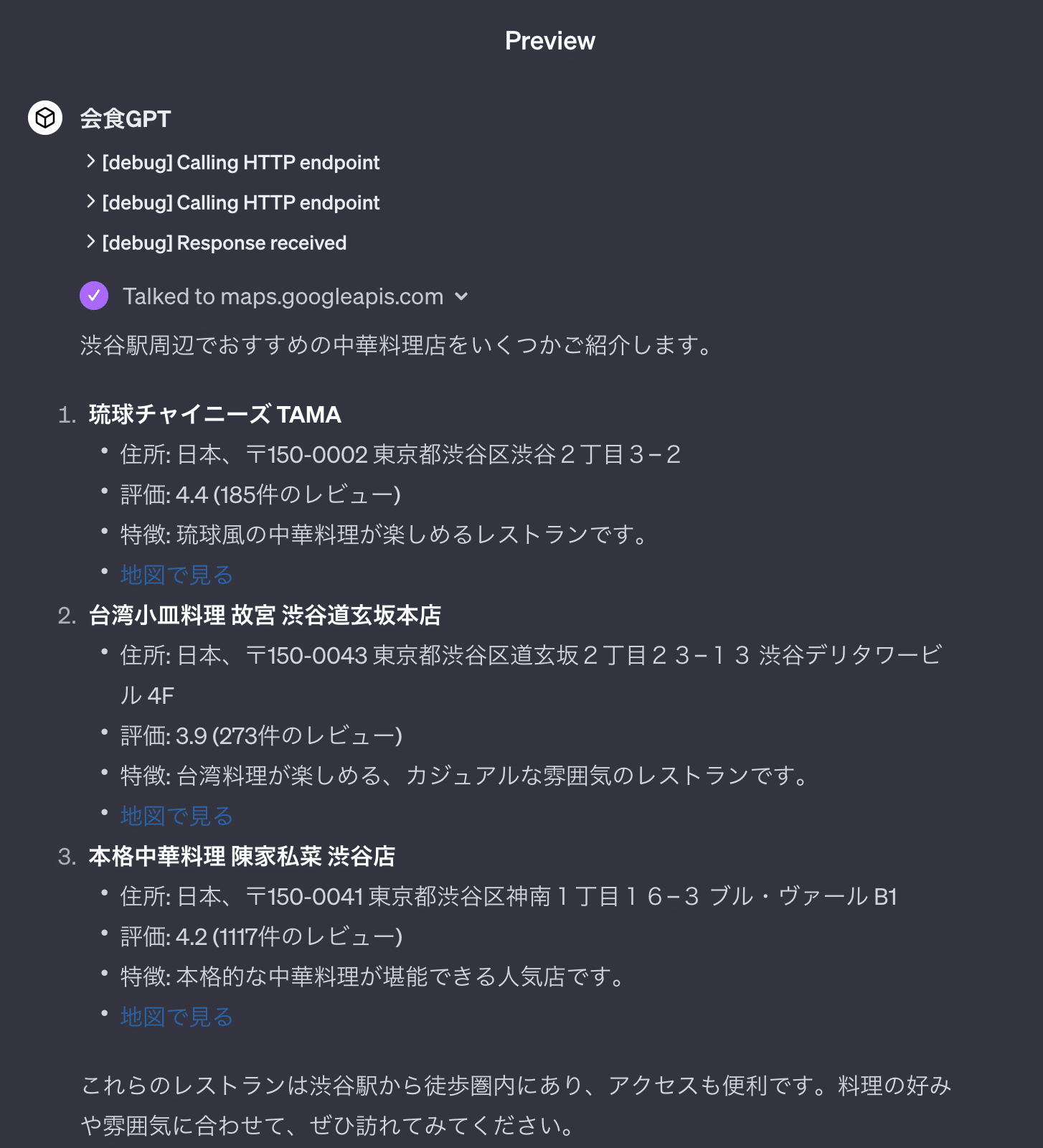
うまく、Google Maps の情報をとってこれていることがわかります。
前回ご紹介した秘書のGPTと組み合わせれば、会食を検索してカレンダーを設定するなどの合わせ技もできます:
https://agi-labo.com/articles/n494a15067a81
※🚨注意🚨
API キーをクエリーパラメータに含まなくてはならない関係上、YAML にそのまま API キーを書いていますが、APIキーがユーザーにバレるため、これは通常良くありません。
今回の YAML を使ったGPTをそのまま外部に公開することは避け、個人用途に限ってください。
外部に公開する場合には、別の中継サーバーを立てるなどの対応が可能です。
API の料金について
今回ご紹介した Goolge Places API は無料ではありません。
具体的には、以下のURLをご参照ください:
https://developers.google.com/maps/billing/gmp-billing?hl=ja
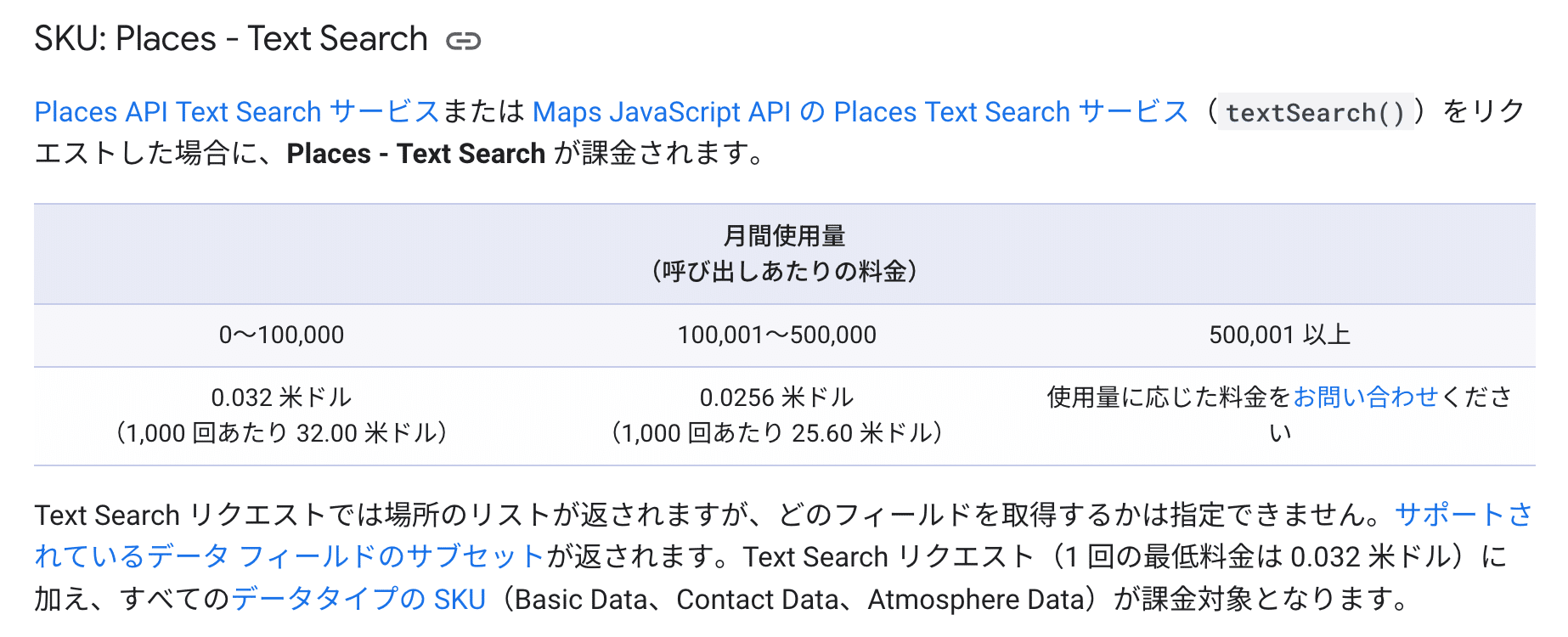
現在は1000リクエストあたり、32$です
参考URL
https://developers.google.com/maps/documentation/javascript/places?hl=ja